
Operations Center
One sentence, grouped actions.
General, Critical, SLA and Today tabs; every counter opens its own list.
Everything that needs action sits on one screen; click any counter and its list opens.
Section 04 · Service and work orders
A request arrives, lands with the right team, runs on site and closes. The service level runs at every step.
A job's journey
Illustrative model
Request
Open a request from a “what do I need” card without picking a technical category. From an asset's page the asset comes ready; an open request for the same asset is flagged.
ExampleA worker on the production line notices a noise from the pump. They open a request from the asset's page; the pump comes pre-filled, and if there is already an open request for the same pump the system warns them.
Routing
Ordered rules route the work to a team. The simulator answers “where does this go, and why” without creating a record; the decision's trace stays on the record.
ExampleThe pump request lands with the Maintenance team by rule. You can test in the simulator, without opening a record, why it went to that team.
Execution
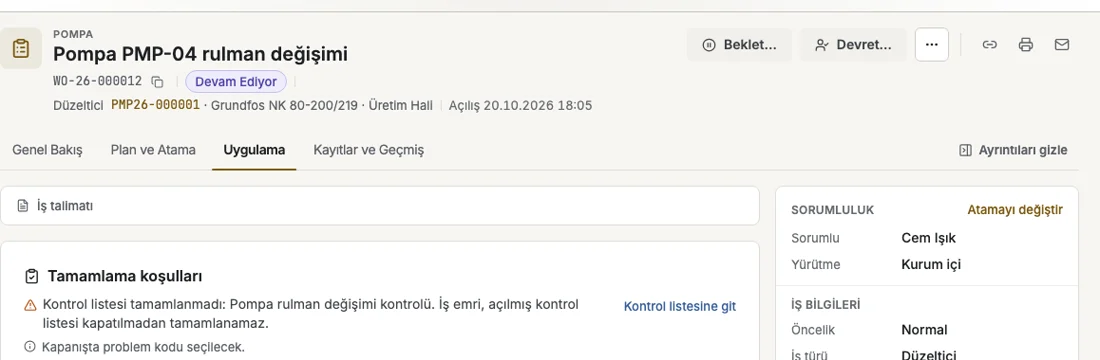
At closure the result, labor and fault code are entered and photo or document evidence is added. An incomplete mandatory checklist, open shipment or missing owner blocks closure.
ExampleThe technician replaces the bearing. If two of the five checklist items are empty the job does not close. Result, labor and fault code are entered and a photo is attached.
Service level
An SLA attaches when a request opens. Overdue items are scanned every 15 minutes and the responsible people are notified. The clock stops while waiting for the requester.
ExampleA service level is attached to the pump request when it opens. The clock stops while the technician waits for information from the requester; if the deadline passes, the people concerned are notified.
Repair
Awaiting intake, diagnosis, in repair, on hold, verification, handover. In-house and external service work share one board; handing over to an external service opens no new work order.
ExampleA faulty laptop goes to an external service. The service process is followed across six stops, and handing it to the external service does not open a new work order.
Maintenance plan
The pump needs a vibration measurement every 60 days; the forklift is serviced every 500 operating hours. When the interval is up or the meter reaches its threshold, the plan opens the work order and assigns it to the person responsible.
Illustration · figures are examples
Materials used
The technician adds the bearing used to the work order. The part is deducted from the relevant warehouse and added to the job's material cost. Planned requirements and actual usage are tracked separately.
On the work order: Bearing 6205 · 1 unit used.
Highlights
Operations Center
General, Critical, SLA and Today tabs; every counter opens its own list.
Everything that needs action sits on one screen; click any counter and its list opens.
Maintenance plan
Every X days or every X km. A due plan opens its work order automatically.
You do not have to remember periodic maintenance; the plan opens the work order itself when it falls due.
Unified calendar
Work orders, maintenance due dates, external service visits and appointments in one calendar.
There is no need to keep separate calendars for maintenance, service and appointments.
Appointment
A faulty asset's drop-off time is picked from free slots; it can be postponed or canceled.
The reception desk will not let you pick a day whose capacity is full; it shows the free slot.
Alarm
A work order or request is opened from a claimed alarm; the alarm closes when the work is done.
The link between alarm and job never breaks; when the job ends, the alarm closes too.
Full scope
Tap an item to see what it does, its details and any limits. Items with a dashed border currently work under specific conditions.
Who it's for
“My requests in one place.”
Follow your requests in the portal, write messages and add photos. You accept a resolved request or reopen it.

Let's work out together the scope for transferring your existing data and the connections you need. Tell us in the call which process you want to see; we'll plan the walkthrough around that workflow.
Request a discovery call