
Asset card
Every action starts from the card.
Assign, transfer, request repair. A closed action shows its reason.
Every action starts from the same place, so you never hunt for the right screen.
Section 03 · Assets and warehouse
Inventory, assignment, warehouse and procurement in one record. With whom, where, in what state: always known.

An asset's journey
Illustrative model
Registration
Items that passed inspection wait in the acceptance queue. Serial numbers and IMEIs are entered; duplicates are reported row by row.
ExampleTwelve laptops arrive at the Bursa site. The warehouse lead accepts the ones that passed inspection; two devices turn out to have serial numbers already on record, and the system flags only those two rows.
Assignment
An assignment goes for approval first; until then the asset stays locked. A handover record with a document number is downloaded as PDF or DOCX.
ExampleA new employee at the Ankara head office is issued a laptop. The device stays with no one until approval comes through; the handover receipt is prepared after approval.
Counting
The team scans by QR; missing items are listed. If stock changed after counting, approval does not overwrite it; the item is recounted.
ExampleThe warehouse lead opens a count session and the team scans the shelves one by one. The person who opened the count cannot approve it; another authorized person does.
Loss
When an asset is reported lost or stolen, the open assignment closes, linked lines are suspended and an alarm opens.
ExampleA laptop is stolen from a service vehicle. The warehouse lead reports it in one action; the custody closes, the line is suspended and an alarm goes out.
Responsibility
An asset's location, the person it is issued to and the responsible unit are kept separate. When an asset is issued, a handover record is created; a return or transfer closes the previous responsibility and starts the new one. The history is not lost.
Highlights
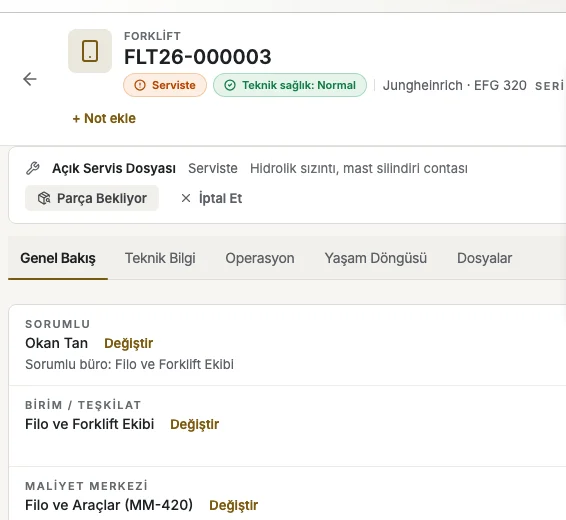
Asset card
Assign, transfer, request repair. A closed action shows its reason.
Every action starts from the same place, so you never hunt for the right screen.
Bulk assignment
Which row will snag, and why, is listed before approval.
Seeing the problem item before approval prevents a half-finished bulk operation.
Warehouse board
Transfers waiting for days and shipments awaiting dispatch are counted.
You do not scan lists to find the stuck work; the number of waiting items is on screen.
Data portability
Import and export as a generic asset CSV or as XML with SAP and Maximo field names.
You bring in your existing inventory from a CSV, SAP or Maximo file and take it back out in the same formats.
Location
Not a score: overdue maintenance, critical alarm, open request.
You understand why a location looks troubled from real records, not from a score.
Full scope
Tap an item to see what it does, its details and any limits. Items with a dashed border currently work under specific conditions.
Who it's for
“Inventory at your fingertips.”
Filter by status, type, unit and assignee. Assets whose warranty is about to end are listed separately.
Frequently asked questions
Yes. Assets load from an Excel template, a generic asset CSV, or XML files that use SAP and Maximo field names. Rows are previewed first; nothing is written to the inventory before you approve.

Let's work out together the scope for transferring your existing data and the connections you need. Tell us in the call which process you want to see; we'll plan the walkthrough around that workflow.
Request a discovery call