
Cost center
Written by a single rule.
Chosen, earlier document, asset, warehouse, unit, in that order. If none applies it stays empty, never invented.
Which cost center a cost goes to is found by a fixed order; it is not guessed.
Section 07 · Organization and working time
Unit, company, cost center and site are written into every record. Shifts and timesheets run on the same structure.

From structure to shift
Illustrative model
Unit
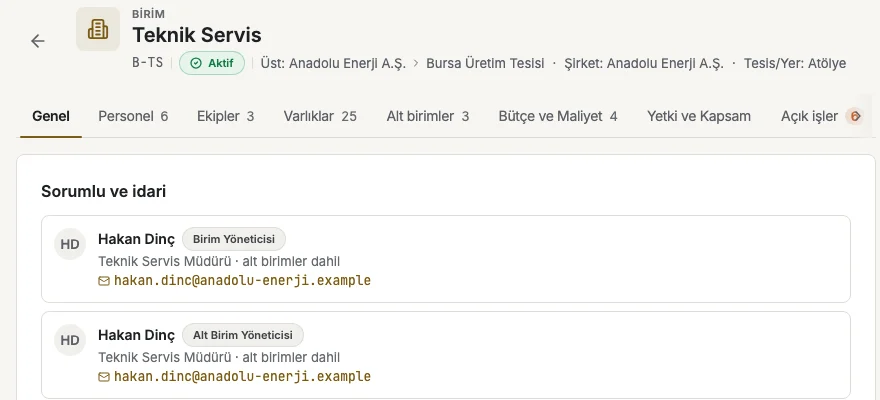
Its staff, teams, assets, budget, authorities and open work in one place. A unit is never deleted, only deactivated; if refused, the reason is given in numbers.
ExampleOn the Technical Service unit's page you see its staff, assets, budget and open jobs together.
Company
The company is written onto orders, invoices, assets and users when a record is created. Even if a unit's company changes later, past invoices stay under the old company name.
ExampleTwo subsidiaries of a holding use the same system. The moment an invoice is issued, the company it was written to goes on record; even if the unit later moves to another company, the old invoice stays with the old company.
Restructuring
In a merge or split the preview changes nothing; it only counts. Once approved, staff, assets, warehouses and open work move to the new unit.
ExampleThe warehouse unit is about to be split in two. The manager first opens the preview and sees, as numbers, how many staff, assets and open jobs will move. The change starts only after approval.
Shift
A rotation is assigned to a person or team and days are corrected by hand. Regenerating the plan does not overwrite corrections; two overlapping shifts cannot be written.
ExampleDay and night shifts are assigned to teams. You change one day by hand; when the plan is regenerated, your change is not overwritten.
Timesheet
Rows are suggested from the shift plan and leave and corrected with a reason. The person who submits a period cannot approve it.
ExampleAt month end, timesheet lines are suggested from the shift plan. The person who submits the period cannot approve it; a second authorized person does.
Your organization's structure
The unit tree follows your organization's real structure. Each unit has its own page: staff, teams, assets, budget and open work. Who sees what is derived from this structure.
Highlights
Cost center
Chosen, earlier document, asset, warehouse, unit, in that order. If none applies it stays empty, never invented.
Which cost center a cost goes to is found by a fixed order; it is not guessed.
Clock-in and out
The system's time is stamped, not the phone's. Location is read once, only if the organization turned it on.
An employee's clock-in time is set by the system's clock, not by their phone's.
Manager correction
A correction is a reasoned cancellation plus a new record. The canceled record stays visible.
A wrong entry is corrected but the original record stays visible.
Working time report
Days without a record, late arrivals, planned versus actual hours. No absence verdict is given.
The report does not interpret; it shows what is recorded. It does not pass a verdict on absence.
Earnings
Normal, overtime, night, weekly rest and public holiday. No pay is calculated; CSV goes to payroll.
The CSV for your payroll software arrives ready; the pay calculation stays with you.
Full scope
Tap an item to see what it does, its details and any limits. Items with a dashed border currently work under specific conditions.
Who it's for
“You build the structure.”
Build the unit tree, define companies and cost centers, and merge or split units when needed.
Frequently asked questions
No. It calculates timesheets and earnings items as time, not pay. The result moves to a payroll or accounting program as CSV; the file holds no amounts.

Let's work out together the scope for transferring your existing data and the connections you need. Tell us in the call which process you want to see; we'll plan the walkthrough around that workflow.
Request a discovery call