
Counting
Open, scan, finish, approve.
Each scan's result is written separately: verified, not found, location mismatch.
Each scan is written separately, so at the end of the count it is clear what was found and what was not.
Section 05 · Field app
Work order updates, checklists, count scans, asset assignment and returns, and goods receipts are saved on the phone and sent in order when the connection returns; no record is created twice. Taking a job from the pool, approving and creating work orders need a connection.

A field day
Illustrative model
Morning
The home screen shows the next job and what is expected of you. Build the day's route from your open jobs and stamp “arrived” or “done” at each visit.
ExampleA technician opens the phone in the morning and sees the first job and pending approvals. At each visit they stamp “arrived” and “done”.
Work
Take on a job from the pool, put it on hold for parts or approval, complete it with a fault code and photo evidence. Release what you cannot do back to the pool with a reason.
ExampleThey take a job from the pool. They put it on hold until the spare part arrives, then carry on and finish with a fault code and a photo.
Checklist
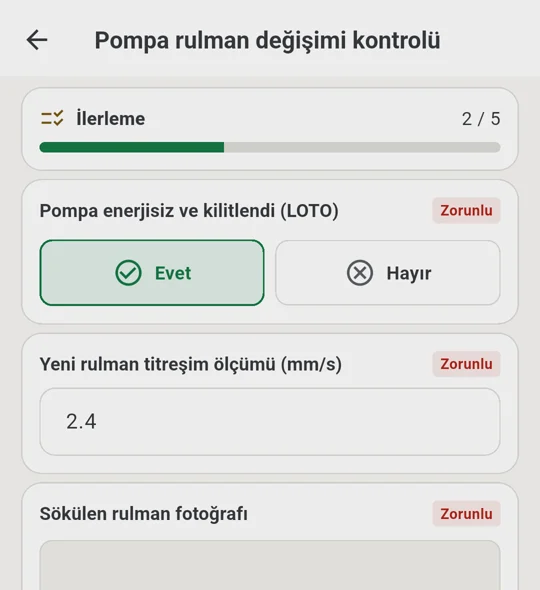
Checklist items are filled in as yes/no, number, text, photo and signature. Mandatory items are checked; a list already loaded on the phone can be filled in without signal.
ExampleAt the transformer station they fill the checklist without a signal: yes/no items, a measurement, a photo and a signature.
Handover
The assignment record arrives on your phone; the giver’s signature is shown, and once the item is in your hands you sign with a single tap.
ExampleTaking over a forklift from the warehouse, the receipt arrives on their phone. The handing-over person's signature is visible; the receiver signs with one tap.
No signal
A record written without signal is saved on the phone under its own key, so a lost reply never creates a second record. A conflicting or refused record is held until a person decides.
ExampleThere is no signal at the transformer station but the technician finishes the job. The phone queues the records and sends them in order when it reconnects.
Office and field
The person responsible assigns the job to a staff member or a team. Field staff carry out supported actions in the Android app and record the materials used, labor and evidence.
Without a connection, supported actions are stored on the phone. They are sent once the connection returns; any that need review are shown separately.
Scanning
The technician scans the code on the equipment with the phone; the related asset, work order, warehouse or location opens. QR, Code128, EAN, DataMatrix, Code39 and NFC are supported. If the light is poor, the code can be typed in by hand.
Highlights
Counting
Each scan's result is written separately: verified, not found, location mismatch.
Each scan is written separately, so at the end of the count it is clear what was found and what was not.
Approval inbox
The decision button appears only when it is your turn. The text says what will happen to the record.
The approver reads what they are approving in the text; there is no vague “approve” button.
Request
Open a request from the service catalog; follow it with messages and attachments.
Staff report a problem they see in the field from the service catalog, with the right category.
Material
A material request goes for approval for what is short; leftovers return to the warehouse.
You request missing material from the field; unused parts go back to the warehouse.
Phone security
The phone's lock also locks the app. When an account is disabled, organization data is erased from the phone.
If the phone is lost or the account is closed, organization data does not stay on the device.
Full scope
Tap an item to see what it does, its details and any limits. Items with a dashed border currently work under specific conditions.
Who it's for
“Work, route and checklist.”
The day's route, work order execution and checklist. Use material from stock and request what is missing.
Frequently asked questions
Work order status changes, checklists, count scans, asset assignment and returns, and goods receipts are queued on the phone and sent in order when the connection returns. The same record is never created twice; a conflicting or refused record waits for a person's decision. Taking a job from the pool, approving and creating work orders need a connection.
QR, Code128, EAN, DataMatrix and Code39 codes and NFC tags. A code maps to an asset, work order, warehouse or location and opens the matching screen. If the light is poor, you type the code.
Work records on the phone sit in an encrypted database; the key is in Android's secure key store. The app can be locked with the phone's lock. When an account is disabled, organization data is erased from the phone.
Let's work out together the scope for transferring your existing data and the connections you need. Tell us in the call which process you want to see; we'll plan the walkthrough around that workflow.
Request a discovery call